Departments

Join Our Newsletter to get updates on Great Deals


How To Order

Placing Your First Order

Placing an order with HomeShopping.pk is easy. There's no need to create an account first. You automatically create an account when you place your first order online. (We cannot accept orders by phone, fax, or e-mail. All orders must be placed online.)
Here are the steps you need to follow to place an order. If you have any problems when following these steps, please
Contact us or ring us a bell at 0323-2030440.

1.     Find the Items you want
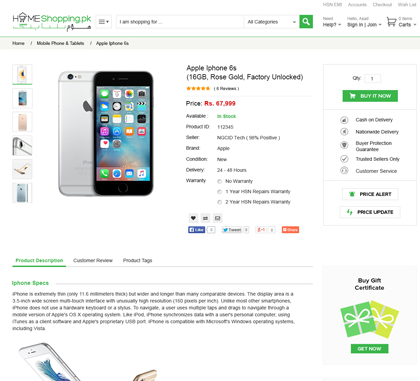
2.    Add The Items to your Shopping cart by pressing the “Add To Cart” button on the right of the product page.
3.    Proceed to Checkout by pressing a button yet again on the right hand side of the page.
4.     Sign In / Create a New Account
5.     Enter Shipping Address
6.    Choose a Shipping Method & Mode of Payment.  
7.     Review and Submit Your Order
8.    Check Your Order Status
9.     Get a confirmation call by the HomeShopping.pk Sales team over the phone.   

Note: Some items offered on our website are fulfilled by Home Shopping Merchants or through Home Shopping Partner Marketplace. Payment, shipping, and return policies may vary by type of order and by seller. Please call our support team for more help.
 

1. Find the Items You Want

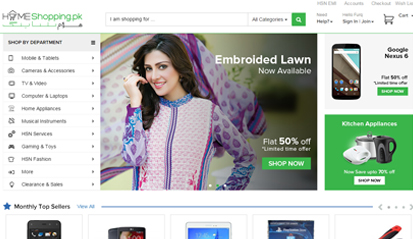
First you will need to browse or search for the items you would like to order. Keyword search boxes are located on nearly every page of our store. You will also find links to browse lists and more detailed product-specific searches in the top navigation bar of each store. When you find an item that interests you, click the title or name of the item to see its product detail page. Here you will find more information about the item, including a Stock estimate of how long it will take before the item will be ready to leave our fulfillment center.
If you don't find what you're looking for in one of our Home Shopping Stores, then get in touch with us as we can find what ever you need from all over the world at better then market price.


2. Add the Items to Your Shopping Cart

If you want to order an item from HomeShopping.pk, click the "Add to Shopping Cart" button on the item's product detail page. Once you've added an item to your Shopping Cart, keep searching or browsing until your cart contains all of the items you want to order. You can access the contents of your Shopping Cart at any time by clicking at the top of every page of our website. Please remember that you can save on shipping charges if you order more then one product as our shipping rates are a flat rate per order not flat rate per item.


3. Proceed to Checkout

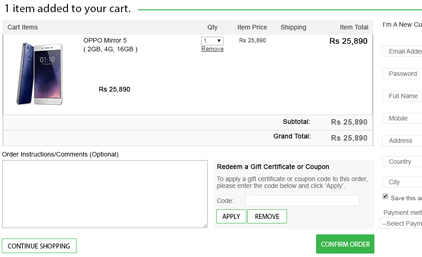
Take a moment to review all of the items you've placed in your Shopping Cart. When you're ready to place an order for everything in the "Shopping Cart Items--To Buy Now" section of your cart, click the "Proceed to checkout" button. You will be taken to the first page of the order form.
The instructions below outline each step of our online order form. If at any point you encounter difficulty or receive an error message, please
Contact Us


4. Sign In

Enter your e-mail address. (Keep in mind that the e-mail address you provide here will be the only e-mail address to which we can send information about subsequent orders.) Indicate that you are a new customer.


5. Enter a Shipping Address

Tell us where you would like to ship your order. We currently have TCS as our partner courier company doing deliveries for us in over 1500 destinations in Pakistan.


6. Choose a Shipping Method

Consider how quickly you would like to receive your order, and choose a shipping method. If you would like to take advantage of FREE Super Saver Shipping and your order qualifies, be sure to select it as your shipping option; you will not receive free shipping automatically. Please note that it's not possible to request a specific carrier.
We will estimate shipment dates for you on the order form, just before you submit your order. You will see estimated shipment and delivery dates in the e-mail we send you to confirm your order.
If there is more than one item in your order, you will be given the following options:

  •      Group my items into as few shipments as possible
  •      I want my items faster. Ship them as soon as they become available (at additional cost)

If you choose the first option, we'll consolidate your items into the fewest shipments possible. We'll show you the minimum number of shipments needed to complete your order. If you choose the second option, we will ship items to you as they become available, beginning with those already in stock. You'll be charged a per-shipment fee for each shipment. Read more about shipping preferences, and find domestic shipping rates or international shipping rates.
The shipping charge for your order will be displayed on the order summary page just before you submit your order.


7. Provide Payment Information and a Password

Next, let us know how you would like to pay for your order. There are a number of payments methods which we have introduced to make sure that our customers feel safe while doing online shopping in Pakistan.


1.     Cash On Pick Up (COP)


 HomeShopping.pk is offering a unique one of its kind COP (Cash On Pick Up) Service to their customers in all the major cities, so that they get the change to physically see the products before they can pay for them. Once the parcel reaches the cities Pick Up center you shall be contacted and asked to come by to pick up your goods and pay the amount in Cash. The cities we are offering COP services are Karachi, Lahore, Rawalpindi, Faislabad, Peshawar


2.     Online Bank Deposit


Now you can order your goods directly to your doorsteps in over 1500 Destinations all over Pakistan. For Home delivery we would like our customers to first place an order on the website and then make a online deposit in our Bank account so that we can then directly send them the goods anywhere in Pakistan. We have our accounts in number of banks giving people of even the remotest of areas the chance to order very much anything they like.


3.     Payment with PayPal (International Customers)


With Home Shopping Pakistan you can make your payments online with your Paypal account. It does not matter if you are a international customer or just buying a gift for someone living in Pakistan. All deliveries for orders paid by Paypal would require 24-48 hours processing period so we can be sure that your payment has been cleared by Paypal into our bank accounts before we ship you the products.  


Note: we do not accept cheques, postal orders, Eurocheques, book tokens or purchase orders.
Choose a password for your account so that when you come back to HomeShopping.pk in the future, you can use the same shipping address and method of payment you provided during this first order. You will also be able to use your password to make changes to your order and account information. Make sure to choose something you will remember the next time you want to place an order.

8. Review and Submit Your Order

Check the accuracy all of the information you provided and make any necessary adjustments. When you are ready, click the "Place Your Order" button to submit your order. Once you place your order you will see the following message "Thank you--we have received your order". Later you'll receive an order confirmation e-mail. We will Call you on your provided Phone number at the time of shipment. 1-Click shopping is automatically turned on for you so that it's even easier to order in the future.


9. Check Your Order Status

If you would like to review or change something about the order you placed before it enters the shipping process i.e. as long as it isn't listed as "dispatching soon" or "recently dispatched" you can change or cancel the order. Click the Your Account link in the top right corner of most pages on our site and then click "Go" next to "Open and recently dispatched orders" you will be able to change the particulars of your order without having to contact us.